
A practice can have a full schedule and still lose time and revenue to disconnected administrative workflows. Staff may move between a scheduling platform, payment processor, billing system, patient messaging tool, spreadsheet, and EMR just to manage one patient from appointment request through payment.
For specialized healthcare practices, the problem is often more pronounced. Integrative and functional medicine providers may combine insurance and cash-pay services. Med spas may manage packages, memberships, products, and recurring appointments. DPC practices need membership billing alongside clinical workflows. Naturopathic and wellness practices may have customized documentation and laboratory workflows that don't fit neatly into a conventional practice management setup.
The right practice management system can bring these moving parts together.
But choosing one requires looking beyond a feature checklist. The better question is whether the software supports the way your practice actually operates, from scheduling and billing to reporting, patient communication, and day-to-day administrative work.
What Is a Practice Management System?
A practice management system is software designed to help healthcare practices manage the operational side of patient care.
Depending on the platform, a practice management system may include tools for:
- Appointment scheduling
- Patient registration and demographics
- Billing and payment processing
- Insurance claims
- Eligibility verification
- Patient communication
- Reporting
- Staff and user management
- Financial tracking
- Documentation and workflow management
Some systems focus primarily on administrative functions. Others combine practice management with an electronic medical record (EMR), creating a more connected workflow between clinical and business operations.
That distinction matters.
A standalone scheduling or billing application may work well for one task, but specialized practices often need information to move between departments and workflows. When systems are disconnected, staff frequently have to enter or verify the same information more than once.
Why Specialized Practices Need More Than Basic Practice Management Software
A conventional practice may have a relatively predictable workflow: schedule the patient, document the visit, submit an insurance claim, collect payment, and send a follow-up message.
Specialty practices can look very different.
A functional medicine clinic might offer longer consultations, laboratory testing, supplements, wellness programs, and cash-pay services. A med spa may combine appointments with memberships, packages, products, and payment plans. A DPC practice may rely heavily on recurring membership revenue rather than traditional insurance billing.
The software needs to accommodate those differences without forcing the practice to build workarounds around its technology.
Hybrid payment models create additional complexity
Many specialty practices operate somewhere between traditional insurance-based care and fully cash-pay medicine.
A single practice might have:
- Insurance-billed clinical visits
- Cash-pay consultations
- Memberships
- Packages
- Self-pay laboratory services
- Retail or supplement-related transactions
When financial information lives across multiple platforms, gaining a clear picture of revenue becomes harder.
A practice management system should make it easier to understand what has been billed, what has been collected, what remains outstanding, and where revenue is coming from.
Comparing Practice Management Software: The Areas That Matter Most
There is no single "best" practice management system for every healthcare organization. The right choice depends on specialty, payment model, practice size, and the amount of clinical functionality you want integrated with administrative workflows.
When comparing platforms, start with these five areas.
1. Scheduling: More Than a Digital Calendar
Scheduling is one of the first places where an inefficient system becomes visible.
A basic calendar may be enough for a small office with one provider and a handful of appointment types. As a practice grows, scheduling becomes more complicated.
Providers may have different availability, appointment lengths, visit types, and scheduling requirements. Some appointments may require specific resources, forms, or documentation before the patient can be seen.
A strong scheduling workflow should make it easy to:
- Manage provider availability
- Create different appointment types
- Schedule patients efficiently
- View upcoming appointments
- Reduce manual scheduling work
- Keep scheduling information connected to the patient's record
For specialty practices, integration with the rest of the practice management workflow is particularly important.
If a patient changes an appointment, staff should not have to update several unrelated systems to keep the practice's records accurate.
What to ask during a software comparison
Don't just ask whether a platform has scheduling. Ask how scheduling interacts with the rest of the system.
Can staff move from the schedule into the patient's chart? Does appointment information remain connected to billing and patient communication? Can the practice support its actual appointment types without excessive customization?
These questions reveal much more than a feature list.
2. Billing and Payments: Where Efficiency Directly Affects Revenue
Billing is often the most operationally sensitive part of practice management.
A small error can create a rejected claim, delayed payment, incorrect balance, or additional staff work. For practices with both insurance and cash-pay services, the workflow can become even more complicated.
A practice management system should support the financial processes your practice actually uses.
For insurance-based practices, relevant capabilities may include:
- Eligibility verification
- Superbills
- CMS-1500 claim workflows
- Clearinghouse submission
- Electronic remittance advice (ERA) posting
- Payment tracking
- Accounts receivable management
For cash-pay and hybrid practices, the needs may be different. Memberships, packages, recurring payments, and point-of-service transactions can be more important than traditional claims workflows.
Point solutions vs. integrated billing
A point solution can be excellent at one task. A dedicated payment processor, for example, may provide sophisticated payment functionality.
The tradeoff is that staff may need to reconcile information between the payment platform and the practice's primary system.
An integrated practice management approach reduces that administrative handoff.
The goal isn't necessarily to eliminate every specialized application. It's to avoid creating a technology stack where routine patient and financial information has to be manually transferred between systems.
3. Reporting: Turning Practice Data Into Useful Information
Reporting is sometimes overlooked during software evaluations because scheduling and billing are easier to demonstrate.
Once a practice is operational, however, reporting becomes critical.
Owners need to understand how the practice is performing, not just how many patients were seen.
Useful reporting can help answer questions such as:
- What revenue was generated during a specific period?
- How much remains outstanding?
- Which services are being used most frequently?
- How are providers performing?
- What does the practice's financial activity look like over time?
- Where are operational bottlenecks developing?
The exact reports needed will vary by specialty.
A DPC practice may care heavily about membership activity. A med spa may focus on packages and service utilization. An insurance-based specialty practice may prioritize claims and collections.
Look for reporting that reduces spreadsheet work
If your office manager exports data from several platforms every month and combines it manually in spreadsheets, that's an operational signal worth paying attention to.
A good practice management system should make routine information easier to access without requiring staff to become data analysts.
4. Patient Communication: Keeping Administrative Work Connected
Patient communication isn't separate from practice operations.
Appointment reminders, messages, forms, lab-related communication, and payment interactions all affect how patients experience the practice.
When communication tools are disconnected from the patient record, staff may spend unnecessary time searching for information or documenting conversations in multiple places.
An integrated patient communication workflow can help practices keep important interactions connected to the patient's overall record.
For example, patient portals can support:
- Secure patient messaging
- Electronic signatures
- Sharing laboratory results
- Patient access to information
- Communication between the practice and patient
This is particularly useful for specialty practices where patients may have more extensive intake requirements, treatment plans, or ongoing communication than a traditional episodic-care model.
5. Clinical and Administrative Integration
This is where the difference between a basic practice management application and an all-in-one healthcare platform becomes especially important.
Consider a typical patient journey.
A patient schedules an appointment. They complete intake information. The provider documents the encounter. A laboratory order is placed. The patient pays for a service. Staff follow up with the patient. The practice later reviews financial and operational reports.
If each step happens in a different application, information has to travel between systems.
If scheduling, patient records, clinical documentation, billing, and communication are connected, fewer handoffs are required.
That can have a meaningful effect on staff workload.
All-in-One Platform vs. Point Solutions
Many practices initially assemble software one application at a time.
They may start with an EHR, then add a scheduling tool, payment processor, patient communication platform, membership application, reporting software, or other specialty solution as needs develop.
There is nothing inherently wrong with this approach. In some cases, specialized software is exactly what a practice needs.
But the total workflow should be evaluated, not just the individual applications.
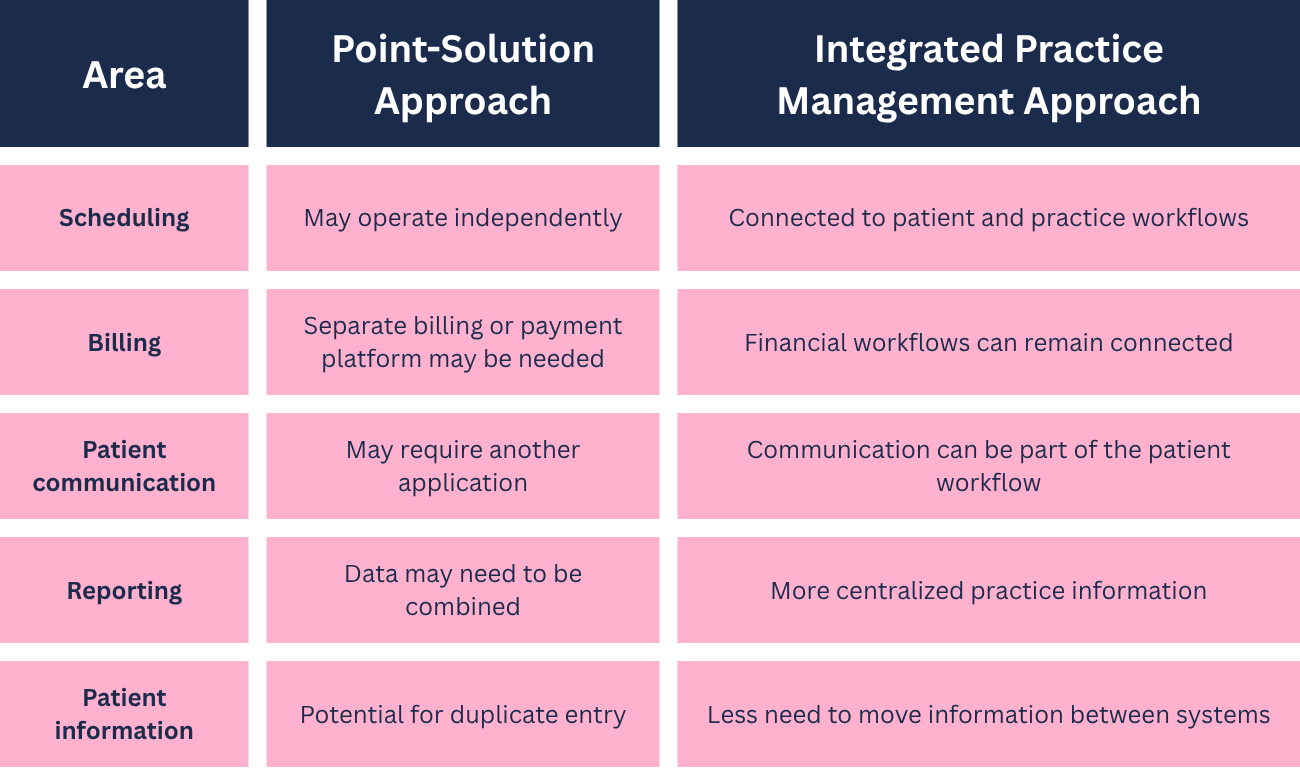

The best choice depends on the practice.
For a highly specialized organization with unusual requirements, several best-of-breed applications may make sense. For a growing practice that wants fewer administrative handoffs, an integrated system may provide a simpler long-term workflow.
How to Evaluate a Practice Management System
A software demonstration can make almost any platform look efficient.
The key is to evaluate the workflow rather than the presentation.
Map your current workflow first
Before speaking with vendors, document what actually happens when a patient:
- Requests an appointment
- Completes registration and intake
- Checks in
- Meets with the provider
- Receives orders or treatment recommendations
- Pays or is billed
- Receives follow-up communication
- Returns for another visit
Then identify where staff currently re-enter information, switch applications, reconcile data, or rely on spreadsheets.
Those are the areas where new software has the greatest opportunity to improve efficiency.
Evaluate the software with real scenarios
Ask vendors to demonstrate workflows that match your practice.
For example:
Functional medicine: Show how a new patient moves from scheduling through documentation, laboratory ordering, billing, and follow-up.
Med spa: Demonstrate how appointments, payments, packages, and patient records work together.
DPC: Ask how recurring membership workflows and patient management are handled.
Hybrid practice: Walk through both an insurance-billed visit and a cash-pay service.
A feature may sound impressive in isolation but be less useful if it doesn't fit the way your staff works.
Don't overlook implementation
Switching systems involves more than purchasing software.
Ask about:
- Data migration
- Staff training
- Implementation support
- Timeline
- User permissions
- Workflow configuration
- Support after launch
- Integration requirements
- Costs beyond the subscription
Data migration deserves particular attention. Historical patient information, demographics, clinical records, and financial information may be essential to maintaining continuity.
The easier the transition, the less disruption the practice faces during implementation.
Common Mistakes Practices Make When Choosing Software
Choosing based on the longest feature list
More features don't necessarily mean better software.
A system with hundreds of capabilities may still be a poor fit if your staff can't use them efficiently.
Prioritize the workflows your practice performs every day.
Treating scheduling and billing as separate problems
Scheduling affects revenue. Billing affects patient experience. Patient communication affects both.
These functions are operationally connected even when software vendors market them separately.
Adding another point solution without considering the total workflow
Before purchasing another application, ask whether it solves a real problem or simply creates another place where staff must manage information.
Forgetting about reporting
A system can work well for front-desk staff while giving practice owners poor visibility into the business.
Reporting should be part of the evaluation, not something considered after implementation.
Evaluating software without staff input
Providers aren't the only people who use practice management software.
Front-desk staff, billers, office managers, and administrators often interact with the system throughout the entire day. Their feedback can reveal inefficiencies that aren't obvious during a provider-focused demonstration.
Practical Takeaways for Practice Owners
When comparing practice management systems, focus less on the number of features and more on how information moves through your practice.
A useful evaluation should answer these questions:
- Scheduling: Can the system support the way our providers and services are scheduled?
- Billing: Does it support our insurance, cash-pay, membership, or hybrid model?
- Reporting: Can owners and managers easily access meaningful operational and financial information?
- Communication: Can staff communicate with patients without creating unnecessary administrative work?
- Integration: Are clinical and administrative workflows connected?
- Usability: Can staff perform common tasks without excessive navigation or duplicate data entry?
- Scalability: Will the platform continue to support the practice as services, providers, and patient volume grow?
- Implementation: What support is available during migration and onboarding?
A good practice management system should make routine work easier, not simply digitize the same inefficient processes.
How OptiMantra Supports Practice Management
OptiMantra combines EMR and practice management functionality in one platform, giving specialized healthcare practices a connected environment for clinical and administrative workflows.
For practices that want to reduce the number of disconnected systems they use, this integrated approach can simplify everyday operations.
With OptiMantra, practices can:
- Manage appointment scheduling and patient workflows.
- Handle insurance billing, eligibility verification, superbills, CMS-1500 claims, clearinghouse submissions, and ERA posting.
- Support membership billing and package-based services for DPC, wellness, functional medicine, and hybrid practices.
- Manage payments and other financial workflows within the platform.
- Communicate with patients through the secure patient portal.
- Collect electronic signatures and share laboratory results with patients.
- Customize chart templates to support specialty-specific documentation.
- Use role-based permissions to manage staff access and responsibilities.
- Keep clinical, administrative, billing, and patient information connected in one system.
If you're evaluating an all-in-one platform for a functional medicine, integrative, wellness, med spa, DPC, or other specialty practice, explore how OptiMantra can fit into your workflow. Request an OptiMantra demo or start a free trial to see how the platform supports scheduling, billing, patient communication, documentation, and practice management in one system.
Disclaimer: This content is provided for informational purposes only and does not constitute medical, legal, billing, or compliance advice. Practices should evaluate software based on their individual operational, clinical, regulatory, and business requirements.